


Follow on Google News


Epson ET-2850 will not connect to Wi-Fi? Read its network report first
Print the Epson ET-2850’s network connection report from Settings > Network Settings > Connection Check when it will not join your wireless network. The report…
How to connect an Epson ET-2850 to a PC with Wi-Fi Direct
Use Wi-Fi Direct on the Epson ET-2850 when you want a computer to connect straight to the printer without a wireless router. The printer creates…
How to share a keyboard and mouse between two PCs through a Dell U2723QE
The Dell U2723QE can share a keyboard and mouse between two computers through its built-in KVM function. Each computer needs a USB data connection to…
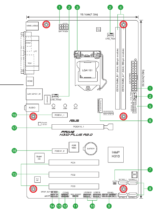
ASUS PRIME H310-PLUS R2.0 manual: power connectors and rear ports
The ASUS PRIME H310-PLUS R2.0 manual provides the connector map for this desktop motherboard, including its older serial and parallel ports. Use the official PDF…
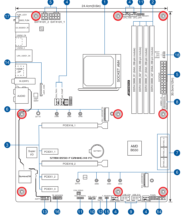
ASUS ROG STRIX B550-F GAMING Wi-Fi manual: connectors and M.2 sharing
The ASUS ROG STRIX B550-F GAMING Wi-Fi manual explains a useful troubleshooting detail: installing a drive in one M.2 slot disables two SATA connectors. Use…
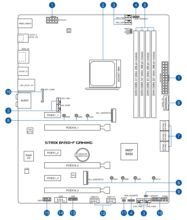
ASUS ROG STRIX B450-F GAMING manual: board layout and rear ports
The ASUS ROG STRIX B450-F GAMING manual is most useful when you need to identify a small header on the board or distinguish similarly shaped…
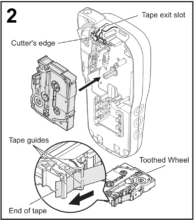
Brother PT-H110 manual: tape cassette, keyboard and two-line labels
The Brother PT-H110 manual is a large foldout-style guide. Zoom into the Getting Started and Basic Usage sections instead of trying to read the entire…
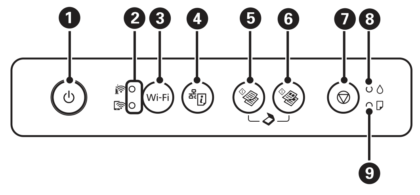
Epson L4150 manual: control panel, ink tanks and network reports
The Epson L4150 manual explains several different actions for the same physical button. A short press can print one network document, while a long hold…
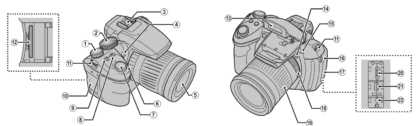
Fujifilm FinePix HS20EXR manual: controls, batteries and setup
The Fujifilm FinePix HS20EXR manual is useful when setting up a secondhand camera because its power system and lens controls differ from many compact cameras.…
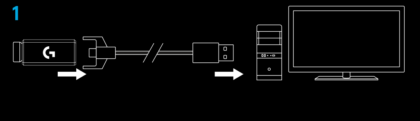
Logitech PRO Wireless manual: receiver, charging and side buttons
The Logitech PRO Wireless manual shows how the supplied USB cable serves two jobs: extending the receiver through an adapter and connecting directly to the…
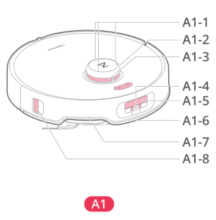
Roborock Qrevo Curv manual: diagrams, Wi-Fi and dock basics
The Roborock Qrevo Curv manual uses letter-and-number references that correspond to a separate diagram sheet. Open both documents from Roborock’s support page: the text explains…
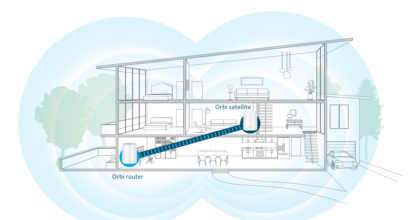
Orbi satellite manual: RBS50 setup, Sync button and light colors
For an Orbi satellite manual, check the model label first. This guide links NETGEAR’s RBS50 quick-start document and explains its placement and synchronization diagrams; do…
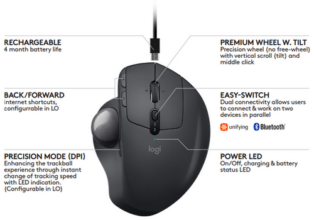
Logitech MX Ergo manual: Easy-Switch, precision mode and tilt
The Logitech MX Ergo manual identifies three controls that are easy to confuse: Easy-Switch chooses a computer connection, precision mode changes cursor behavior, and the…
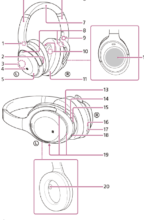
Sony WH-1000XM4 manual: controls, charging and wear sensor
The Sony WH-1000XM4 manual explains the physical controls and sensors as well as Bluetooth features. Start with the parts diagram if you are unsure which…
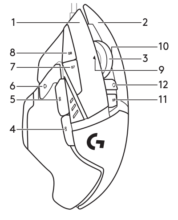
Logitech G502 HERO manual: button map, weights and scroll wheel
The Logitech G502 HERO manual is most useful for identifying the mouse’s buttons and adjusting its removable weights. Start with the button drawing below: the…
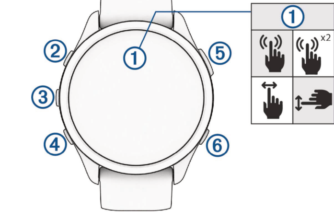
Garmin Forerunner 265 manual: buttons, phone setup and charging
The Garmin Forerunner 265 manual is easiest to navigate by task: start with the physical buttons, then phone pairing, then charging. The overview below helps…
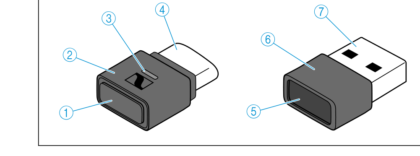
Sennheiser BTD 700 manual: USB connection and headphone pairing
The Sennheiser BTD 700 has two separate connections to check: USB to your phone or computer, and Bluetooth to your headphones. A successful headphone pairing…
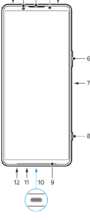
Sony Xperia 1 V manual: controls, SIM tray and model differences
The Sony Xperia 1 V manual covers several regional models, and their SIM arrangements differ. Check your exact XQ-DQ model before following the tray illustration:…
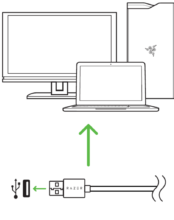
Razer Cynosa Chroma manual: USB setup and Fn shortcuts
The Razer Cynosa Chroma manual separates the keyboard’s USB connection, built-in Fn shortcuts and software customization. If you simply want volume, playback or brightness controls,…
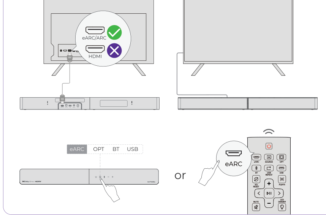
Ultimea Poseidon M60 manual: HDMI ARC and subwoofer connections
The Ultimea Poseidon M60 manual shows two connections that are easy to overlook: the TV cable must use the appropriate ARC/eARC socket, and the subwoofer…