
Sennheiser BTD 700 manual: USB connection and headphone pairing


 2 min. read
 Published on
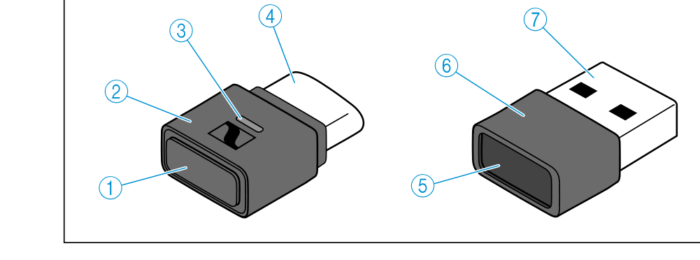
The Sennheiser BTD 700 has two separate connections to check: USB to your phone or computer, and Bluetooth to your headphones. A successful headphone pairing does not by itself tell you which audio output your computer is using.
Open the original Sennheiser BTD 700 manual. The official PDF covers the BTD 700 USB Bluetooth audio dongle and its supplied USB-A adapter.
Choose USB-C or the supplied adapter
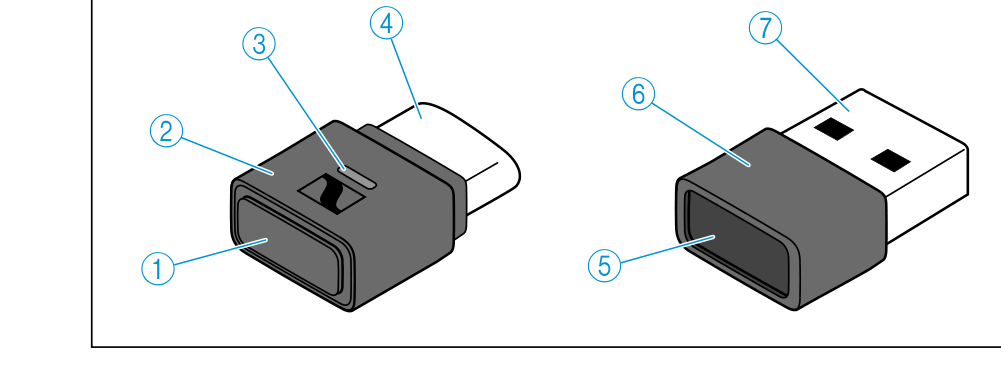
The dongle plugs into USB-C directly; the supplied adapter provides a USB-A connection. Sennheiser describes it as an external sound card that does not require a separate driver installation.
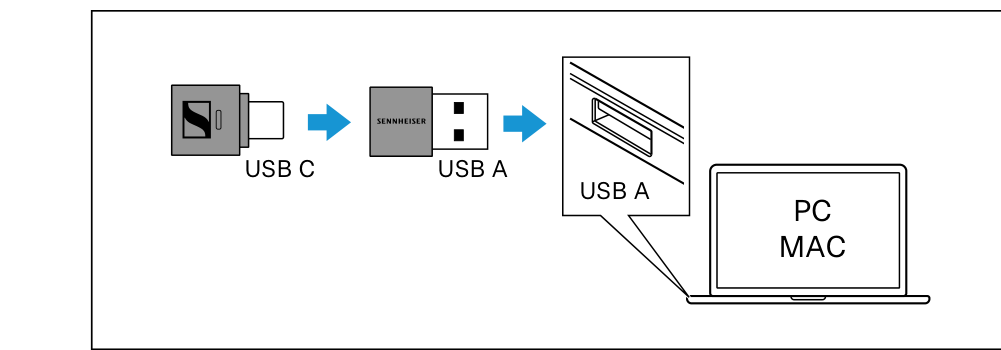
The manual specifies mobile devices and PC/Mac use, not TV or hi-fi use. On a phone, avoid leaving the protruding adapter under mechanical strain.
Pair the headphones with the dongle
Put the headphones into their own pairing mode first. The BTD 700 normally searches automatically after connection; if necessary, hold its pairing button for three seconds. Alternating red and white indicates pairing, and three white flashes confirm success.
Watch the dongle’s indicator, not just the headphone’s light. The two devices can be in different states. If you cannot identify the headphone’s pairing mode, consult that model’s instructions before repeating the dongle procedure.
Check audio routing before resetting anything
If pairing succeeds but playback is silent, inspect the output selected by the operating system and by the calling or media application. Treat this as a separate check from Bluetooth pairing.
For troubleshooting, write down the host device, USB connection used, headphone model and observed LED sequence. That creates a useful record of where the connection stops working and avoids repeatedly resetting an already paired accessory. The manual’s getting-started section begins on PDF page 7.
Documentation-based guidance. Screenshots are credited excerpts from the manufacturer’s manual; this is not a hands-on product test.


Read our disclosure page to find out how can you help MSPoweruser sustain the editorial team Read more



Improve this guide
User forum
0 messages