
Logitech G502 HERO manual: button map, weights and scroll wheel


 2 min. read
 Published on
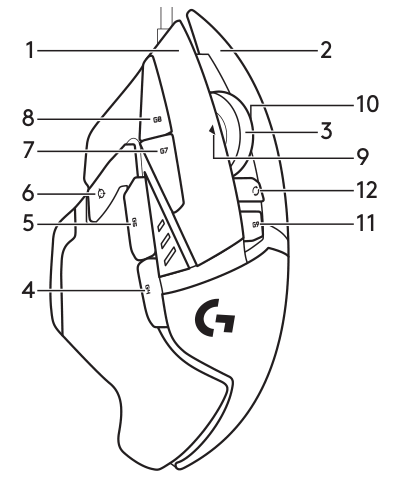
The Logitech G502 HERO manual is most useful for identifying the mouse’s buttons and adjusting its removable weights. Start with the button drawing below: the wheel-mode switch and profile selector are different controls, even though both sit behind the wheel.
Open the original Logitech G502 HERO manual. The English instructions start near the beginning of this multilingual PDF. This guide concerns the wired HERO model.
Read the button diagram before remapping
The numbered drawing on PDF page 7 identifies the controls. G7 and G8 change DPI, G6 provides DPI shift, and G9 selects profiles. The wheel-mode switch changes scrolling mechanically and is not programmable.
If pointer speed suddenly changes, identify which button you pressed before changing a game’s sensitivity. A mouse-level DPI change and an in-game sensitivity change can produce similar symptoms; adjusting both at once makes the cause harder to isolate.
Open the weight compartment
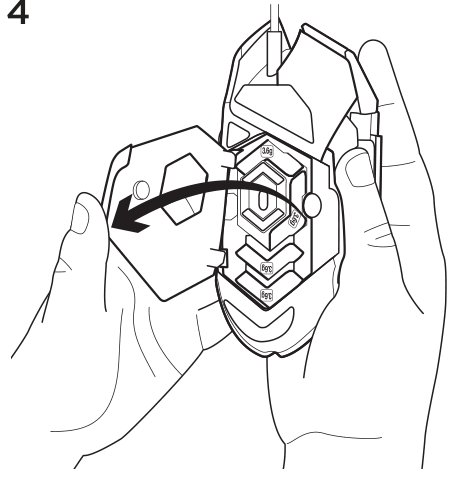
The underside door opens from its thumb-side edge, as illustrated on PDF page 4. The following page shows placement of the supplied weights.
Try one weight arrangement at a time on the same mouse surface. Compare both movement and lift-off comfort before adding more. Keep unused weights together so you can return to your original arrangement.
Use the right section for your problem
For scrolling behavior, read PDF page 11; for onboard profiles and DPI indicators, start at page 10. Basic USB troubleshooting is on page 12.
This older manual refers to Logitech Gaming Software. Treat its software screenshots as historical documentation and check Logitech’s current support information before installing a utility. The physical button map remains the useful starting point when you need to distinguish a hardware control from a software assignment.
Documentation-based guidance. Screenshots are credited excerpts from the manufacturer’s manual; this is not a hands-on product test.


Read our disclosure page to find out how can you help MSPoweruser sustain the editorial team Read more



Improve this guide
User forum
0 messages