
Fujifilm FinePix HS20EXR manual: controls, batteries and setup


 2 min. read
 Published on
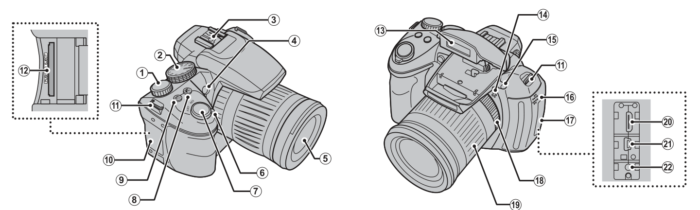
The Fujifilm FinePix HS20EXR manual is useful when setting up a secondhand camera because its power system and lens controls differ from many compact cameras. Check the battery type and the physical control map before treating an unfamiliar response as a fault.
Open the original Fujifilm FinePix HS20EXR manual. The original English owner’s manual has 132 PDF pages. Printed page 2 is PDF page 14.
Identify the two lens rings
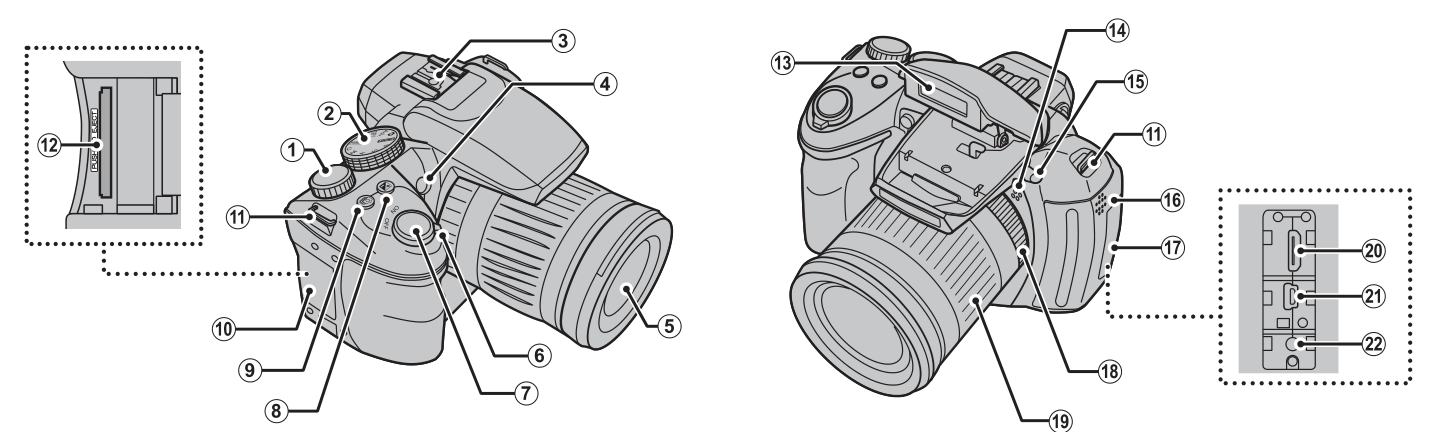
The parts diagram labels the focus ring as 18 and the zoom ring as 19. It also separates the command dial from the shooting-mode dial. Use the accompanying parts list on printed page 2 to find the detailed instructions for each.
When testing the camera, change one control at a time and watch what changes on the display. Turning a lens ring and changing shooting mode in the same test makes it harder to identify whether the result comes from framing, focusing or exposure.
Use matching batteries and the correct menu setting
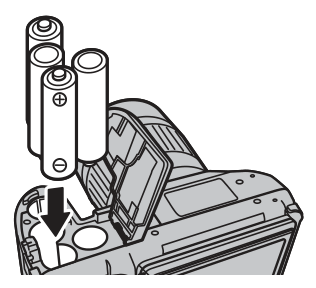
The HS20EXR takes four AA alkaline, lithium or rechargeable Ni-MH batteries. Fujifilm warns against mixing old and new cells, different charge levels or different types. Follow the polarity marks inside the compartment.
After changing battery chemistry, the manual directs you to update the Battery Type setting so the level indication is interpreted correctly. This is explained on printed page 9, immediately after the insertion instructions.
If a used camera shuts down unexpectedly, record the cell type and the selected battery setting before moving on to other troubleshooting. Do not force the compartment cover if it does not close normally.
Navigate by printed page numbers
For first photographs, start at printed page 15. Shooting modes begin at 21 and warning-message explanations at 109. The PDF viewer’s page counter includes the introductory pages, so it will be higher than those printed numbers.
The computer-software sections describe the era in which the camera shipped. Use them to understand the documented connection method, but check compatibility before installing bundled software on a current computer.
Documentation-based guidance. Screenshots are credited excerpts from the manufacturer’s manual; this is not a hands-on product test.


Read our disclosure page to find out how can you help MSPoweruser sustain the editorial team Read more



Improve this guide
User forum
0 messages