
Windows 11 24H2 is making it clearer when you use apps that support now-in-preview Windows Studio Effects
Windows 11's KB5050094 update for 24H2 is now live


 2 min. read
  Published on
Key notes
- Windows 11 24H2 adds an icon to indicate when apps use Windows Studio Effects, powered by the NPU.
- Studio Effects make video and audio better with AI features like background blur and voice focus.
- The update also fixes an Auto HDR issue and improves taskbar previews.
NPU, or the Neural Processing Unit, is the backbone of Copilot+ PCs. And with Windows 11’s latest KB5050094 update for the 24H2 version, Microsoft is making it clearer when your PC or laptop is making the most out of it.
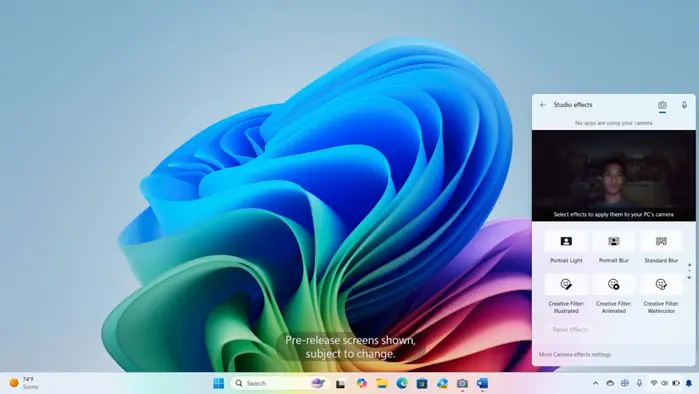
As Microsoft explains, Windows 11 will soon show an icon in the system tray when you use an app that supports Windows Studio Effects, an AI-friendly feature that’s currently in preview. But, it only happens when your device has an NPU, which is an important piece of tech behind Copilot+ PCs.
Then, you can the icon to open the Studio Effects page in Quick Settings. To view the app that is using the camera, you can hover over the icon for a tooltip.
Windows Studio Effects lets Windows 11 boost video and audio quality using the NPU. It gives AI effects like background blur, eye contact, auto framing, voice focus, and portrait light, which are applied at the hardware level across apps.
You can control these effects via the Camera Settings app, and developers can integrate them using Windows APIs without little to no performance hit. That’s useful for activities like video conferencing on Teams or creating content, like editing photos or videos.
Still from KB5050094-related news for Windows 11, Microsoft is now putting an end to this annoying Auto HDR error that oversaturates the visual of the game that you’re playing. It also revamps the previews when your cursor hovers over apps on the taskbar, among other things.


Read our disclosure page to find out how can you help MSPoweruser sustain the editorial team Read more



Improve this guide




User forum
0 messages