
TestMu AI Review: How AI is Solving the Quality Engineering Problem


 10 min. read
  Published on
Key notes
- End-to-End AI Agents for every step of the software testing process.
- Generate complex test cases with just natural language prompts.
- Test your apps on any conceivable real-world device or browser at scale.

Releasing flawless software is always the goal, but with so many devices and environments to cater to, the QA and QE process is increasingly costly and bloated.
Do you retain an expert team of testers, or do you outsource? What about an in-house device lab, or is emulation the way to go, despite its limitations?
Fortunately, TestMu AI has evolved into an ambitious cloud platform that aims to solve all these problems with agentic AI.
It offers an all-in-one solution for creating and executing tests in real-world environments, at a fraction of the cost and timescale.
TestMu AI Overview
What began as a high-performance testing cloud has become an AI-native, multi-agent platform for quality engineering. Its end-to-end AI agents can plan, author, execute, and analyze software quality with little more than prompting.
Out of the gate, it understands codebases, project documentation, and sources like GitHub. Moreover, it seamlessly integrates with your existing stack, offering 120+ integrations.
Whether your project is desktop, mobile, or web-based, its real-world testing infrastructure is a step ahead of emulated or simulated environments.
Having already served 2.8 million developers and testers across 90+ countries, let’s take a closer look at why TestMu AI could be the solution for you.
Core Products
TestMu AI’s platform comprises four main products that work in sync to cover all stages of the testing lifecycle.
KaneAI – World’s First GenAI Testing Agent
KaneAI is where most users will want to start their journey. This GenAI-native end-to-end software testing agent takes your test descriptions and generates structured, executable test cases. This immediately eliminates the need for you to have programming knowledge, which brings obvious cost and time benefits.
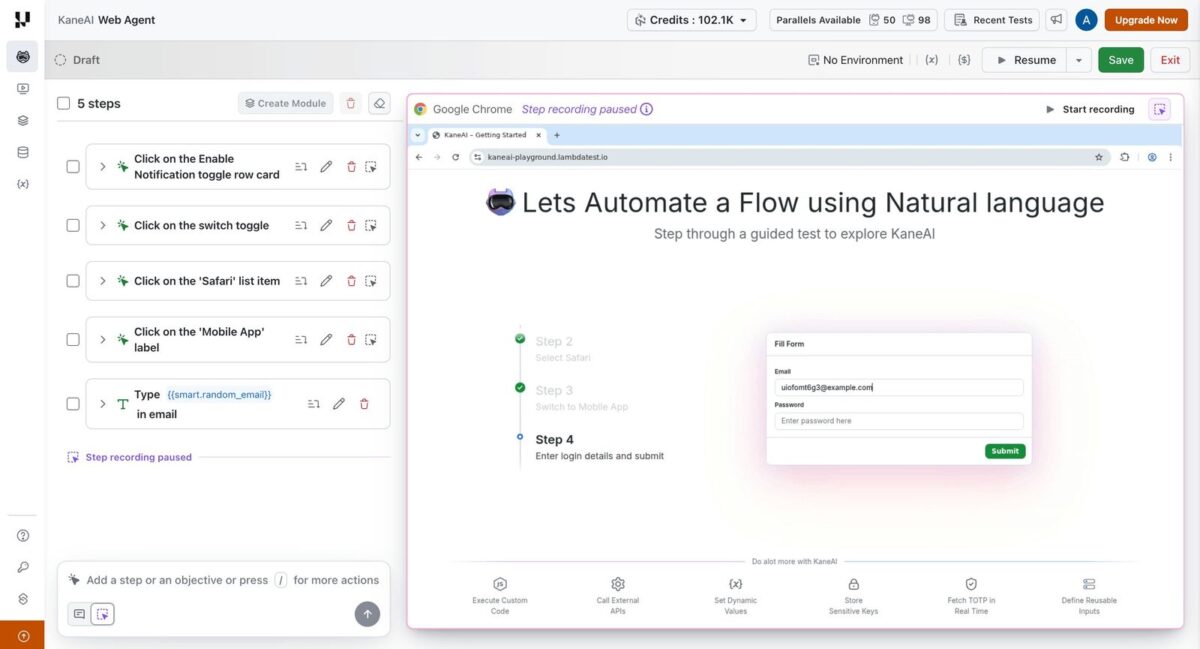
One feature I found particularly useful was KaneAI’s ability to understand existing project assets. It can analyze everything from source code and Jira tickets to PDFs, images, audio, videos, and GitHub pull requests. It then turns these, in tandem with your prompts, into detailed test scenarios with little manual interruption.
It also simplifies test maintenance. When an application’s interface changes, it can identify many of the affected elements and automatically update existing tests. This keeps test suites running with less manual intervention.
Another advantage is that KaneAI doesn’t lock you into its own ecosystem. Tests can be exported to popular frameworks including Playwright, Selenium, Cypress, and Appium. This gives development teams complete ownership of their automation code and the flexibility to run tests wherever they choose. Existing workflows can also remain largely unchanged, making adoption much easier.
It’s easy to switch between Browser Cloud and Real Device Cloud to execute tests across different environments. Common actions, such as logging in, navigating menus, or completing a checkout, only need to be created once. These modules can then be reused across multiple test cases, reducing duplication and making larger automation suites much easier to maintain.
There’s also Kane CLI for teams who don’t need the full cloud setup every time. It brings the same plain-English test authoring straight to your terminal, running locally instead of spinning up a browser session in the cloud. Think fast pre-commit checks or a step baked into your CI pipeline rather than a full test run. It’s included for free in every KaneAI plan, including Starter, so there’s no extra cost to unlock it.
Pricing runs per agent, billed annually, across three tiers:
- Starter at $19/agent/month (2,000 credits, local Kane CLI authoring only)
- Pro at $99/agent/month (12,000 credits, adds Cloud KaneAI Web authoring)
- Max at $199/agent/month (25,000 credits, adds Cloud KaneAI Mobile alongside Web).
- Enterprise offers unlimited credits and custom terms.
Agent Testing – Use AI to Test your AI
As AI-powered applications become more sophisticated, testing them has become far more challenging. Traditional QA tools work well for predictable software, but they’re not designed to assess the dynamic responses produced by chatbots, voice assistants, and other large language model (LLM) applications. TestMu AI’s Agent Testing addresses this by providing an automated framework for evaluating AI behavior at scale.
Instead of manually creating hundreds of prompts, the platform can generate 60 to 100 or more test scenarios from a single product requirements document (PRD) or similar project file. This dramatically reduces the preparation time needed to achieve broad test coverage.
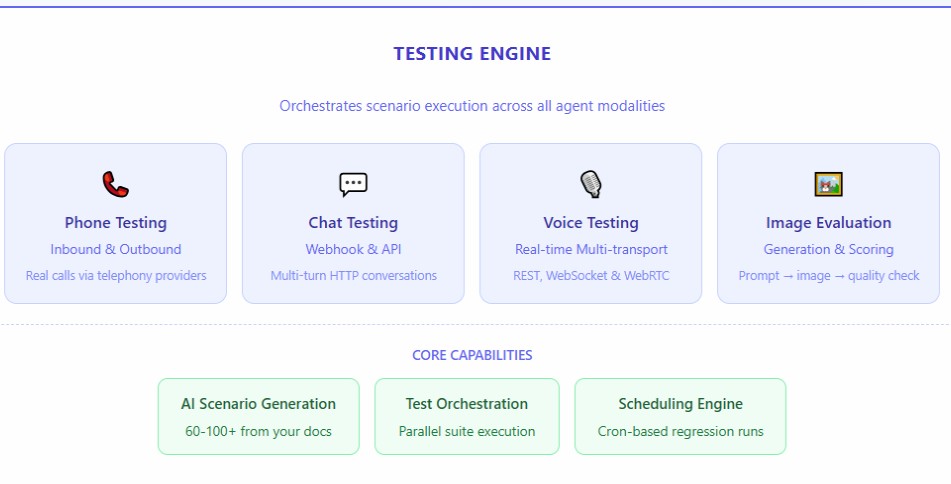
Behind the scenes, more than 15 specialized AI evaluators work simultaneously to assess different aspects of an AI agent’s performance. These include hallucinations, bias, loss of context, poor tone, incomplete responses, and resilience against adversarial prompts. The same approach can be applied across a wide range of AI applications, including conversational chatbots, voice assistants, telephone agents, and image analysis systems.
I also appreciated the depth of the reporting. Rather than a simple pass-or-fail result, Agent Testing provides detailed scoring tailored to each AI type.
Chat and voice agents are evaluated across nine key quality metrics; phone agents are evaluated on more than 30 criteria, while image agents are assigned an overall quality score between 0 and 100. Because the evaluations are reproducible, teams can accurately measure improvements as prompts, models, or application logic evolve.
Agent Testing can be used before launch to establish a baseline quality, after model updates to detect regressions, or as part of ongoing monitoring to ensure AI agents continue to perform as expected over time.
Agent Testing is sold as a contact-sales product rather than published self-serve tiers – pricing is scoped to your scenario volume across chat, voice, phone-call, and image-agent coverage after talking with sales. There’s currently no public PAYG credit rate or fixed starting monthly price posted.
Real Device Cloud – Better than Emulation
Nothing replaces the accuracy of validating software on the exact hardware your audience relies on. This is a core strength of TestMu AI’s Real Device Cloud. The platform provides instant, browser-based access to 10,000 physical Android and iOS devices, as well as native Windows and macOS environments. You can even set up geolocation in 170 countries.
By executing every test on real, dedicated hardware rather than on emulators or simulators, teams can better mirror real end-user conditions. This real-world testing bypasses subtle edge cases that emulators often miss, including device-specific GPU rendering bugs, native hardware sensor interactions, OS-level anomalies, and real performance throttling under heavy load.
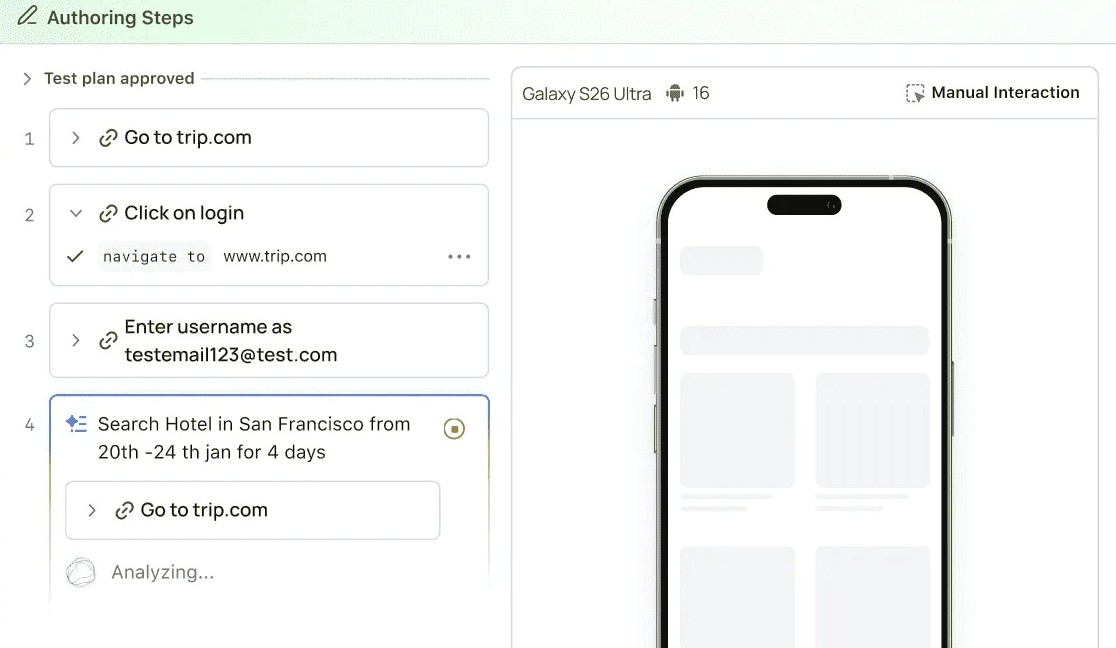
Alongside flagship releases like the latest iPhone, Samsung Galaxy, and Google Pixel models, the Real Device Cloud maintains extensive coverage for legacy devices that still hold significant market share. Building and managing a comparable internal device lab is simply unfeasible. TestMu AI eliminates that overhead entirely by delivering an on-demand fleet with zero hardware maintenance requirements.
Flexibility is built into the workflow, supporting both live manual validation and scalable automated runs. During manual sessions, engineers can interact with live applications in real time directly inside the browser. For automated pipelines, the platform natively supports industry-standard mobile testing frameworks—including Appium, XCUITest, Espresso, and Detox—enabling teams to execute existing test suites without refactoring their code.
Additionally, network simulation allows teams to stress-test applications across 2G, 3G, 4G, and 5G, as well as custom bandwidth profiles and dropped-connection states. This, for example, can identify performance bottlenecks and edge-case bugs that only trigger under poor network conditions.
The platform also accounts for native mobile features. Complex authentication flows can be tested end-to-end using native support for Face ID, Touch ID, and Android fingerprint sensors. Hardware inputs, including camera feeds, QR code parsing, accelerometers, and gyroscopes, function as they would in an end-user’s hands.
For active development cycles, engineers can install and transition between multiple app builds within a single session, significantly speeding up regression checks.
Desktop coverage is equally thorough. Beyond mobile hardware, TestMu AI provides access to live, native environments running Windows 10, Windows 11, macOS Ventura, and macOS Sequoia. This enables web development teams to test across actual desktop operating systems without the overhead of maintaining dedicated local test stations.
For evaluation, TestMu AI offers a free tier that grants 5 sessions per month, each up to 2 minutes, with no credit card required. Paid plans scale based on workflow needs:
- Live manual testing on real devices (Real Device Plus Live) starts at $39/month.
- Automated testing on real devices (Real Device Plus Automation Cloud) starts at $199/month, both billed annually.
- ($15/mo is TestMu AI’s Virtual Live tier – emulators and simulators rather than physical hardware – so it belongs to a different product line than Real Device Cloud.)
Browser Cloud
The Browser Cloud delivers enterprise-grade browser infrastructure for AI agents that scrape, test, and automate the live web, without the headaches of underlying infrastructure.
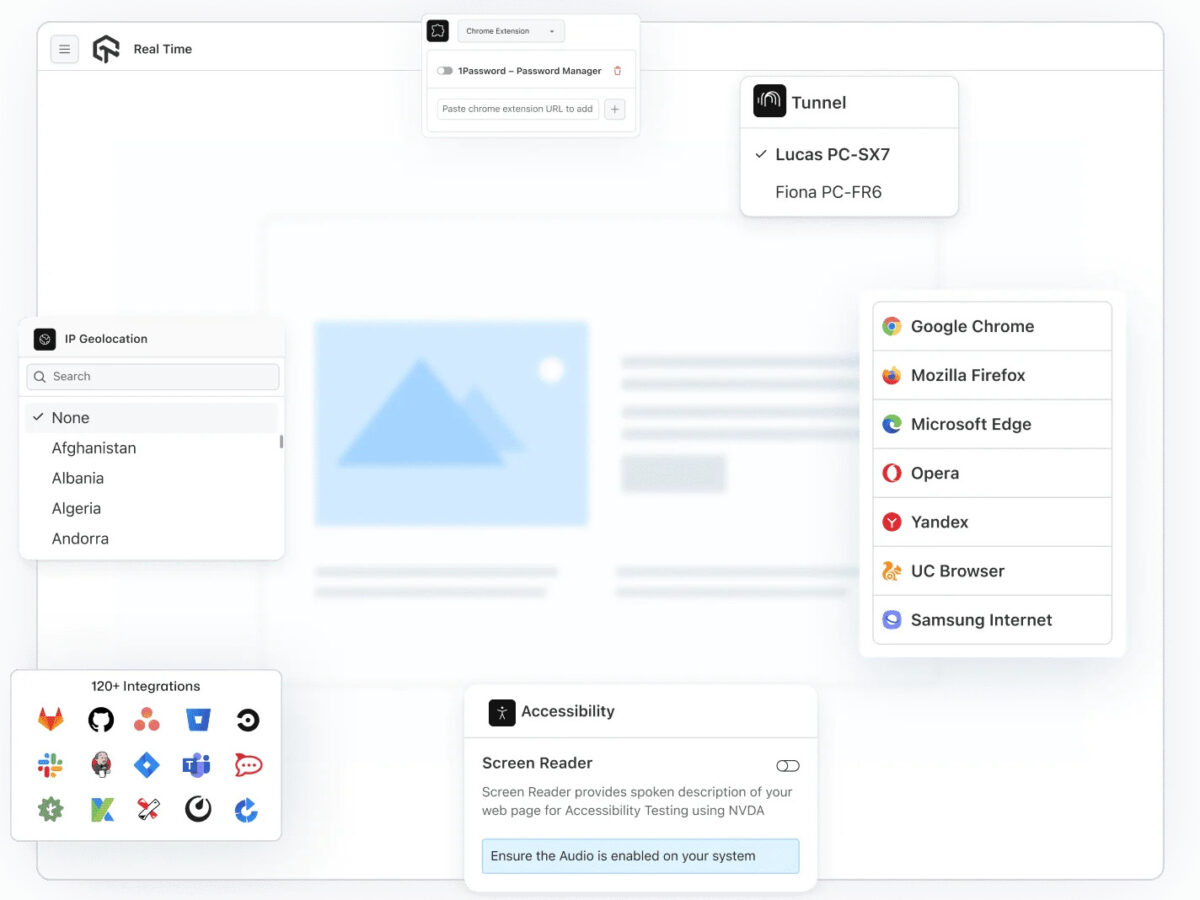
It supports popular AI ecosystems, including Claude, OpenAI, Gemini, Cursor, and custom-built agents, enabling teams to create browser-driven workflows that scale on demand.
Instead of configuring and managing individual browser instances, developers can launch cloud-based Chrome sessions within seconds and run multiple sessions in parallel. Sessions can remain active for up to 24 hours, making Browser Cloud suitable for long-running automation tasks, large-scale testing, research agents, and complex web workflows.
One of the platform’s key advantages is that agents interact with full browser environments rather than simplified HTTP responses. Websites are fully rendered, JavaScript executes normally, and dynamic single-page applications behave as they would in a user’s browser. This allows AI agents to work with complete page states and rendered DOM content, improving reliability for automation and data extraction tasks.
Browser Cloud also includes tools designed for navigating the challenges of the modern web. Built-in stealth capabilities such as fingerprint masking, CAPTCHA handling, and ad blocking help reduce interruptions during automated browsing. Geo-targeted proxy support across more than 180 locations enables agents to access websites from different regions and test location-specific experiences.
For workflows that require authentication or continuity, session persistence is another important feature. Cookies, local storage, and login states can be carried across sessions.
Debugging is also built into the platform, allowing teams to replay sessions and identify issues much faster.
Browser Cloud is compatible with existing automation frameworks, including Playwright, Puppeteer, and Selenium. This means teams can connect existing automation projects with minimal changes rather than rebuilding their workflows around a proprietary system.
For developers wanting to try the service, TestMu AI offers a free tier that includes 100 accessibility tests and 100 minutes of web automation testing with two parallel sessions. Paid Browser Cloud access starts at $29/month when billed annually, with higher-tier options available for larger requirements.
TestMu AI – Verdict
The strength of TestMu AI lies in how its core products complement each other while still fitting into existing development workflows. Teams can adopt individual capabilities as needed or use all of them from start to finish across the entire QA lifecycle.
KaneAI helps teams create and maintain tests using natural language instead of extensive scripting. Agent Testing addresses the emerging need to evaluate AI-powered applications, while Real Device Cloud enables reliable testing across real hardware at scale. Browser Cloud extends these capabilities further by providing AI agents with ready-to-use browser environments without the complexity of managing infrastructure.
By reducing repetitive manual work and eliminating much of the infrastructure burden associated with modern testing, TestMu AI allows QA and development teams to spend more time on improving user experiences, increasing coverage, and delivering better software.


Read our disclosure page to find out how can you help MSPoweruser sustain the editorial team Read more



Improve this guide




User forum
0 messages