
Android apps support in Windows 11 is based on Intel's Bridge Technology, but will work on AMD devices as well


 1 min. read
  Published on

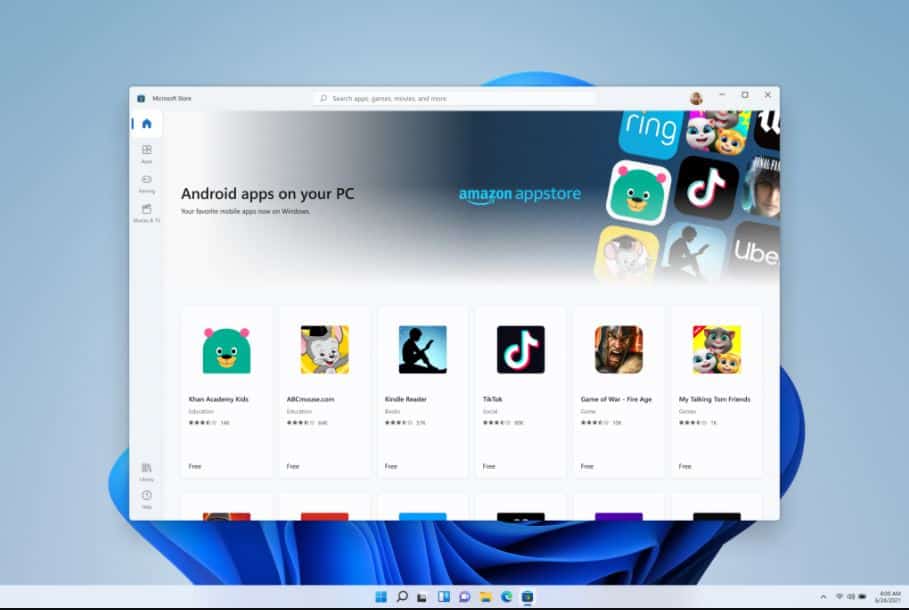
Microsoft yesterday announced that Android apps are coming to Windows 11. Consumers will be able to find their favorite Android apps from the new Amazon App Store section that will be available inside the revamped Microsoft Store app.
Android apps support in Windows 11 is based on Intel Bridge Technology. Intel Bridge Technology is a runtime post-compiler that enables applications to run natively on x86-based devices, including running those applications on Windows.
Intel’s multi-architecture XPU strategy provides the right engines for the right workloads by integrating leading CPU cores, graphics technology, artificial intelligence accelerators, image processors and more, in a single, verified solution.
For ARM devices like Surface Pro X, Android apps will have no issues since all the Android apps are natively built for ARM-based devices. For AMD-based x86 devices, Microsoft will be using the same Intel Bridge Technology to support Android apps. We have to appreciate Intel for providing the Bridge technology to improve the overall x86 ecosystem.
Source: Intel


Read our disclosure page to find out how can you help MSPoweruser sustain the editorial team Read more



Improve this guide




User forum
0 messages