
Logitech Z407 manual: input buttons, connections and setup guide


 2 min. read
 Published on
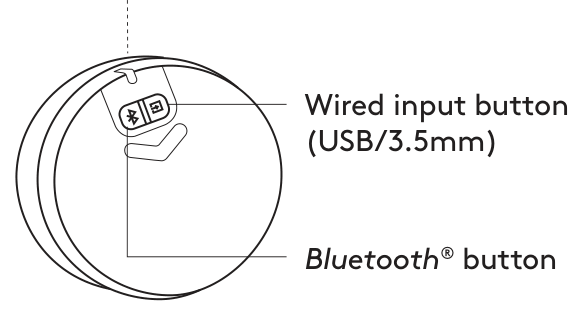
The Logitech Z407 manual explains three ways to connect the speakers: Bluetooth, a 3.5 mm audio cable and USB. The input buttons are underneath the wireless control dial, so plugging in a cable is only part of the setup.
Open Logitech’s original Z407 setup guide (PDF). English instructions occupy pages 3–10. This guide points you to the useful sections and explains how to choose the right connection for your desk.
Find the input buttons underneath the dial
The dial’s light identifies the selected source: blue means Bluetooth, purple means 3.5 mm and white means USB. Use the Bluetooth button for wireless audio or the wired-input button to select a cable connection.
That gives you a useful first check when there is no sound. Compare the light with the cable you are actually using before changing settings on your computer. A connected cable and a selected input are two separate things.
Choose USB, 3.5 mm or Bluetooth
For USB, the subwoofer uses a micro-USB socket. Logitech’s illustrated connection uses USB-A at the computer; the USB cable is sold separately. For 3.5 mm audio, connect the source to the subwoofer’s AUX input.
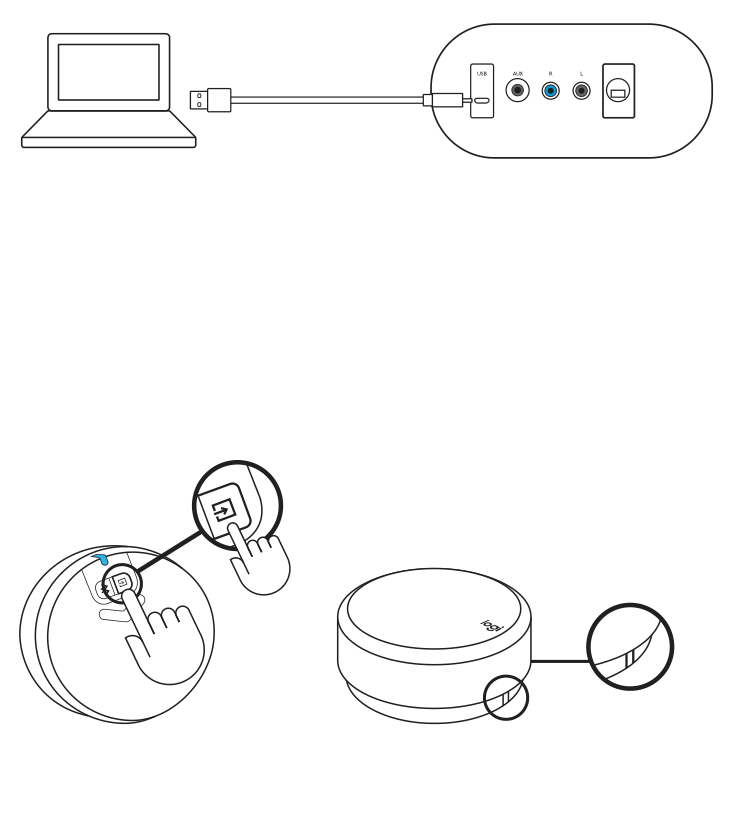
For a permanent desk setup, a cable avoids having to manage Bluetooth pairing between your computer and other devices. For a phone that you carry around, Bluetooth avoids a physical audio connection. Choose according to how you use the speakers rather than assuming that every available connection needs to be configured.
Go straight to the right manual section
Use page 4 for speaker placement and assembly, page 5 for Bluetooth pairing, page 6 for wired connections, and pages 8–10 for the dial’s controls and reference table. Keep the PDF open beside your setup so you can compare the drawings with the physical buttons.
If the hardware connections look right but only one application is silent, test a second audio source before resetting the speakers. This helps distinguish a source-selection problem from an application problem and avoids changing a working setup unnecessarily.
Source: Logitech’s Z407 setup guide. The images above are excerpts from that manual, not photographs from hands-on testing.


Read our disclosure page to find out how can you help MSPoweruser sustain the editorial team Read more



Improve this guide
User forum
0 messages