
Microsoft rolling out updated editing experience for Windows 11 Photos app


 1 min. read
  Updated on
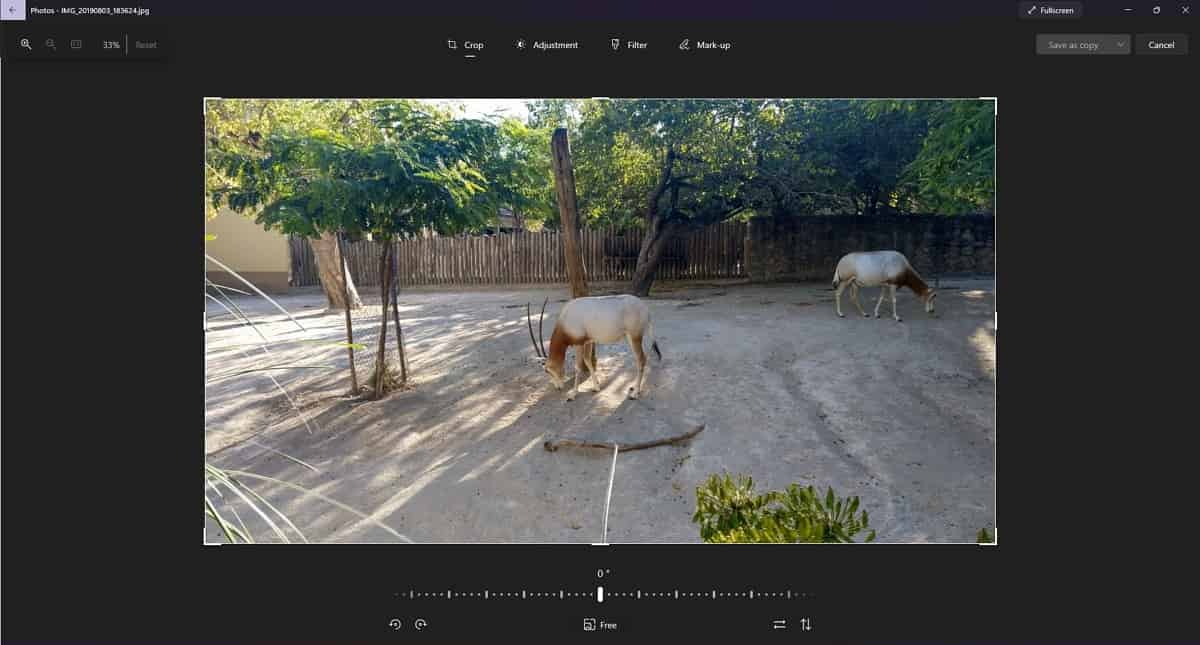
Back in September 2021, Microsoft released an updated Photos app for Windows 11 Insiders with new WinUI 2.6 controls, new Mica effect and new photo views. Today, XDA-Developers noticed that Microsoft is rolling out an updated editing experience in the Photos app. This latest Photos app update (2021.21120.8011.0) is available for all Windows 11 users (even non-Insiders). The updated editing experience comes with the following changes:
- The cropping tool is now displayed below the image. Also, you can now choose an aspect ratio to crop to. Also, when you adjust the cropping area, you can see the exact resolution of the cropped area.
- If you edit a transparent image, you can notice checkered background in the transparent areas of the image.
- In the Adjustments tab, the controls are displayed by default. Clarity, red eye removal and spot fix features are now removed.
- The Filters tab has some new filters with new names.
- The ability to draw on images is now in its own tab called Mark-up.
Source: XDA-Developers

Readers help support MSpoweruser. We may get a commission if you buy through our links.

Read our disclosure page to find out how can you help MSPoweruser sustain the editorial team Read more



Improve this guide


User forum
0 messages