
Design.com AI Logo Generator vs Tailor Brands: Accuracy, Styles & Pricing Compared


 6 min. read
  Updated on
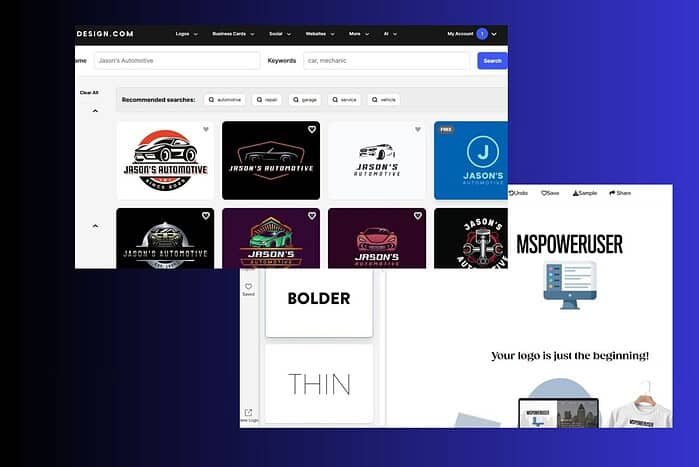
AI-powered logo makers help businesses launch quickly, especially when they need a clean, functional brand identity without hiring a designer. Two of the most popular options today are Design.com and Tailor Brands. Both tools generate logos with AI, but the experience, accuracy, customization, and value differ enough that choosing between them isn’t always obvious.
I tested both platforms with the same business name and overall creative direction. Here’s how they stack up.
Accuracy of AI-Generated Logos
Design.com
Design.com generates logo concepts almost immediately after entering your business name and industry. The platform pulls from the world’s largest library of 360,000+ logo templates and combines that with its AI logo generator. The ideas that came back were consistent and clean. The AI understood the industry cues well, and the icon-to-text proportions rarely looked off.

Because the library includes thousands of exclusive shapes and icons and over 525 exclusive fonts, the output feels more varied than most AI generators. Some concepts clearly leaned toward modern tech aesthetics, while others followed corporate or vintage patterns depending on the filters I applied. The filtering system helped narrow down results by style or color without slowing down the workflow.
Tailor Brands
Tailor Brands takes a more guided approach. Before generating anything, it asks you to pick between several brand personality options, font themes, icon styles, and layout choices. This influences the final concepts, but it also limits spontaneity. The generated logos looked clean and usable, but many felt similar across different test runs.

Accuracy is good overall, but Tailor Brands’ logo ideas tend to follow a predictable formula, especially when you stick with its default styles. The platform doesn’t offer the same scale of exclusive icons or fonts, and it shows in how often designs start to resemble each other.
Verdict:
Design.com offers higher variety and better adaptability thanks to its larger template and icon library. Tailor Brands is accurate but more repetitive.
Style Variety & Customization
Design.com
Style flexibility is one of Design.com’s strong points. You can filter by abstract, mascot, emblem, wordmark, vintage, classic, or corporate styles. This makes it easy to explore very different directions. Once you select a concept, you can refine:
- Colors
- Fonts
- Slogan placement
- Icon-only variations
- Custom layouts

You can also take the design into a more advanced editor where you adjust spacing, proportions, and positioning with more control. Because Design.com includes over 62,000 custom vector shapes, logo variations feel more unique and less templated.
Tailor Brands
Tailor Brands favors simplicity. The customization panel allows users to change fonts, colors, icons, and layout orientation, but not much more. You don’t get deeper control over spacing or object proportions, and icon variations feel limited compared to Design.com.

The strength of Tailor Brands lies in its ease of use, not in customizable depth. If you want a quick, clean design, it works. If you want precise style control, you will feel the limitations quickly.
Verdict:
Design.com wins by a large margin. It offers more styles, more variations, and more ways to adjust the output.
Branding Ecosystem
Design.com
Design.com goes far beyond logo files. The platform includes over 1 million design templates, and every asset automatically inherits your logo colors. This includes:
- Business cards
- Social posts and stories
- Flyers and posters
- Presentations
- Letterheads
- Menus
- Digital business cards
- QR codes
- Website pages (via the AI website builder)

The ecosystem includes 50+ branding tools, and everything follows your brand look immediately. You can even register a domain and print your logo on mugs, business cards, apparel, and more — with free delivery.
Tailor Brands
Tailor Brands includes a brand kit and offers tools like social media post creators, business documents, and website templates. It also adds services outside design, such as automated business formation (LLC setup), which matters more for entrepreneurs than designers.

For branding-specific tasks, the template variety feels smaller, and many designs repeat the same core layouts. It does have a website builder, but integration and template flexibility lag behind Design.com.
Verdict:
Design.com provides a broader and more cohesive branding toolbox. Tailor Brands leans more toward small business admin tools than deep design capabilities.
Pricing Comparison
Design.com
Design.com uses a subscription model with three annual plans:
- Starter — $5/month (billed annually)
High-res and vector logo files, unlimited edits, business cards, social templates, email signatures, letterheads, and 1M+ design templates. - Value — $6/month (billed annually)
Everything in Starter plus access to the AI website builder. - Premium — $7/month (billed annually)
Adds link-in-bio pages and digital business cards.

All designs are commercially safe, and you can download many assets for free, including logos, websites, and business cards.
Tailor Brands
Tailor Brands uses three main subscription plans, all billed annually:
- Basic — 3.99/month (billed annually)
Logo + simple editing
- Standard — starting at $5.99/month (billed annually)
Logo + full brand kit + social templates
- Premium — starting at $12.99/month (billed annually)
Adds website builder + domain offers + some business tools

Tailor Brands also charges more for certain add-ons, and some features only unlock at higher tiers.
Verdict:
Tailor Brands offers simpler tiers but typically costs more for above-basic branding features. Design.com provides more value at lower price points.
Which One Should You Choose?
Choose Design.com if you want:
- Better AI logo variety
- A larger and more exclusive design library
- More control over styles and editing
- A full ecosystem of branded assets
- Free design options
- Physical printing with free delivery
Choose Tailor Brands if you want:
- A more guided setup
- Basic logo creation without deep customization
- Business formation and admin tools attached to your branding workflow
Final Verdict
For users who care about logo quality, style variety, and a complete brand identity system, Design.com delivers the stronger package. Its larger library, exclusive assets, and integrated branding tools give it a clear edge. Tailor Brands remains a solid option for quick business setup, but when the focus is AI logo creation and overall design flexibility, Design.com comes out ahead.


Read our disclosure page to find out how can you help MSPoweruser sustain the editorial team Read more



Improve this guide




User forum
0 messages