
X-VPN Review: Best VPN Provider of 2026? [Free & Premium]


 11 min. read
  Updated on
Key notes
- Fast and stable speed with robust security and privacy.
- 10,000+ global servers and excellent unblocking success.
- Includes kill switch, split tunneling, and other advanced VPN features.
- Generous free version covering all common devices, no data limitations, and no login required.
- Powerful ad blocker, dark web monitor, and other extras.
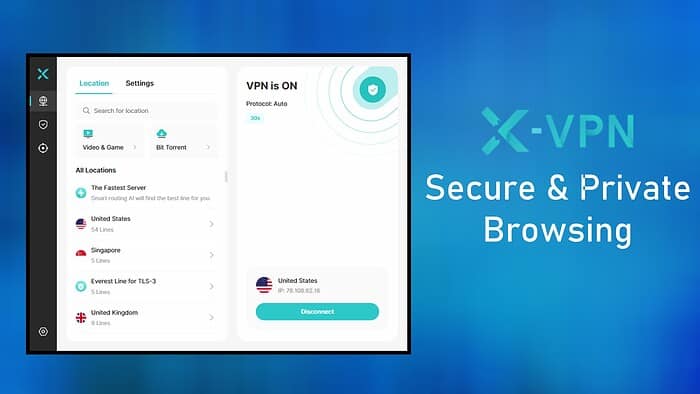
X-VPN has been around since 2017, but in recent months it has ramped up performance and introduced new features on Mac and Windows.
The VPN provider, which is operated by LIGHTNINGLINK NETWORKS PTE. LTD. in Singapore, now boasts over 100 million downloads and is highly rated across platforms.
Today we explore the free and premium version of X-VPN on Windows. Is it the best VPN as we close out 2026?
Global Servers
X-VPN has excellent and growing global coverage, with servers spanning 80+ countries and 250 state and city-level locations.
This is supported by a network of 10,000 individual servers – 1,000 for free users and the rest reserved for premium users.

On Windows, it takes one click to quickly connect to the fastest server based on your location. There is also a Stable Connection feature that takes a bit longer to connect but uses a range of nearby servers optimized for your network conditions.
With such broad coverage, you will never struggle finding a fast local server to protect your internet activity or a location overseas to unblock geo-restricted content.
The use of RAM-only servers enhances privacy further, as no data is ever stored on physical drives.
Speed
The speed you get with a VPN depends on several factors, including the regular speed of your internet, the distance between your real location and the VPN server, and network conditions.
Upon testing, we had no problems with connection stability or download speed.

When comparing our unprotected connection from London, England, to X-VPN’s server in Dublin, Ireland, using the auto Everest protocol, download speed dropped by just 11.6%.

Dublin is quite close, but it only rose to about 20% when connected to a VPN server much further away in Australia.
All VPNs will lower baseline speed because the traffic must pass through the additional server, but if this drop isn’t more than 30%, it’s considered good.
Firing up Netflix and YouTube with X-VPN turned on did not result in quality drops or buffering, and file download speeds remained consistent.
Speed is a bit more inconsistent on the free servers, but that is to be expected.
Overall, the server network is very reliable and is made up of majority 10Gbps machines. X-VPN is also in the process of upgrading 30% of the network to 40Gbps servers.
Optimized Servers
X-VPN recognizes that speed and performance isn’t a one-size fits all process, that’s why it categorizes some of its servers specifically for gaming, streaming, and downloading.

Under the app’s locations tab, you can click through to these different server types, with around 140 streaming servers covering countries with popular streaming services. There are over 50 options for torrenting, and dedicated servers for gaming including Roblox, Pokémon Trading Card Game, BGMI, and PUBG.
Although any location and server will support this type of activity, you may find the optimized servers more reliable.
Protocols and Obfuscation
By default, X-VPN uses its proprietary Everest protocol when encrypting your connection. This is built with obfuscation technology, which also hides the fact you are using a VPN.
This makes it harder for ISPs, network admins, government censors, streaming services, and other entities to block you from using a VPN to bypass restrictions.
The fact that Everest is closed source makes it even less likely to be discovered.

Under the protocol setting of the app, there is also the option to enter a trusted domain to further mask your activity. For example, if you enter an innocuous URL like google.com, any entity snooping on your activity will see Google as the source of the traffic.
Users are given the freedom to configure the protocol to their liking. Moreover, if you’d prefer to use an open-source protocol, WireGuard and OpenVPN can be selected.
WireGuard will offer the best speed, but Everest is better for reliability and unblocking.
X-VPN Free Version
The free VPN version is one of the best we’ve seen, offering unlimited data and access to 1,000+ free servers. This keeps the network surprisingly uncongested, even though it’s open to everyone. The apps also work without registration, so you can maintain privacy without paying a penny.
That said, the free server options do vary a bit depending on the platform. On Windows, macOS, and Chrome, you’re automatically connected to the nearest server within about 50 countries — simple and hands-off. Mobile users, on the other hand, get a bit more freedom: you can manually choose from all 26 available locations, which is unusually generous for a free plan.
Feature-wise, X-VPN for free provides all the core features: AES-256 encryption, obfuscation, a stable connection, a kill switch, and protocol selection. However, you miss out on more premium VPN features and advanced security tools, especially on desktop.
Premium Subscription
The paid version of X-VPN comes with a 7-day free trial and a 30-day money back guarantee. All plans include the full server network, and all advanced security features.
Each subscription supports up to 5 devices at once, across any support platform.
It’s good to see you can pay with crypto. It also permits throwaway email addresses, and pseudonyms, so there is no identifiable record of your account.
Depending on how long you commit for upfront, there are excellent savings to be made.
- 24 Months: $69.99 ($2.99/mo)
- Monthly: $11.99
- Yearly: $47.99 ($3.99/mo)
Compared to other VPNs, X-VPN is very competitively priced, beating ExpressVPN, NordVPN, and Surfshark feature-for-feature.
Technical Features
Let’s take a closer look at X-VPN’s technical features and why they stand out:
Kill Switch
A kill switch is an important security feature that prevents your IP and internet activity from leaking in the event that the VPN connection drops or you fail to turn the VPN on.

When toggled in the settings, it automatically cuts off your internet connection until the device is protected.
It’s not set by default, but it’s advisable to use the kill switch if you are on public Wi-Fi or cannot risk being exposed even for a few seconds.
Leak Prevention
As well as the kill switch, X-VPN has advanced leak prevention built-in. This closes common technical glitches that can expose your real IP.
For example, WebRTC is a technology used in web browsers for real-time communication, but it can reveal your actual IP address even when using a VPN. X-VPN prevents this from happening.
Likewise, whenever you enter a domain into your address bar it accesses servers for the Domain Name System (DNS). These servers are usually assigned by your ISP, which can cause a mismatch in location, potentially indicating you are using a VPN. X-VPN ensures the DNS matches the VPN location.

We connected to an Australian server and used IPLeak.net to verify that X-VPN does not leak IP and DNS information.
X-VPN also provides its own leak checking tools on the website and mobile apps.
Split Tunneling
Split tunneling is a VPN feature that enables you to selectively route specific traffic through the encrypted VPN connection, while allowing other traffic to access the internet directly without going through the VPN.

X-VPN’s split tunneling is app-based, so you set the option to enable or disable the list of apps for the VPN. Click Add to browse for each app to include in the list.
This allows you to maintain privacy and security for sensitive tasks, such as browsing the web or unblocking regional content, while preserving speed and unrestricted access for activities like online gaming or connecting to printers and local devices.
In the future it would be beneficial to have URL-based split tunneling too, so you can choose the specific sites that should be subject to the VPN.
No-Logs Policy
So, X-VPN successfully protects your internet connection, but what about the fact you are using a VPN?
Fortunately, it adheres to a functional no-logs policy, as confirmed by the LA Times. This means your VPN activity is not recorded. Moreover, the company pledges to never sell, use, or disclose any data to any third party, for any purpose.
This is supported by the fact that since inception, it has never shared such data even after law enforcement and DMCA Takedown requests.
Taking a closer look, the no-logs policy includes:
- Never logging browsing history, transferred content, usage habits, or any other online activities.
- Using zero-retention packet handling and RAM-only servers.
- Accepting cryptocurrency payments, requiring no payment details from users.
- Never tracking your real IP, location, device info, or payment info that can be linked to who they are.
- Supporting account creation with disposable or fake email addresses, with no verification process.
- Allowing users to choose open-source protocols over Everest.
Windows App
Today we tested the VPN for PC, but X-VPN is also available on macOS, Linux, iOS, Android, Amazon Fire TV, and more.
Ad Blocker
It’s a misconception that VPNs fully protect you online. While they do encrypt your real-time internet activity, a VPN connection on its own can’t prevent tracking and other threats that come from webpages themselves.
On the Windows VPN app, browser protection and the ad blocker can be found by clicking the main Security tab on the left menu.

Toggle it on and the majority of popups, banners, and other ads will be removed when browsing the web.
Blocking ads doesn’t just make browsing less annoying, it also speeds up pages and helps prevent ads from tracking you.
I was surprised how good the ad blocker is, going far beyond the native popup blocker in Chrome and plugins that claim to remove banner ads.
Most of the time it’s a clean removal, but sometimes you might see a red cross over an ad that failed to load.
I also noticed a warning on YouTube that it does not permit ad blockers, but I could cross this off and it didn’t prevent me from watching videos. There is an option to whitelist certain sites for displaying ads, so this is an option if YouTube does make it an issue.
Browser Protection
As well as ads, the browser protection feature lets you block tracking cookies that monitor your browsing habits and history.

It also blocks dangerous websites, highlights unsecure pages in search results, and prevents malware and suspicious files from being downloaded. These are quarantined so false positives can be restored.
Dark Web Monitor
If your email account has been compromised in a bulk attack, it is often included in lists shared and sold on the dark web by cybercriminals.

X-VPN scans your registered email address in real-time against these dark web data breach lists and sends an alert if found. Depending on the data available, it can show the site where the data was originally stolen, whether the password was included, and the date of the breach.
You can then take steps to change the password and secure the account before any damage is done.
It supports 4 additional email addresses for ongoing monitoring, but you will have to verify them first.
Storage Cleanup
The cleanup tool removes unnecessary files, logs, and cached items from your PC. This helps free up valuable space on your device and can improve overall performance.

Additionally, X-VPN offers an Auto Clean function that allows users to schedule cleanup tasks to run automatically in the background.
Startup Manager
X-VPN’s Startup Manager is a feature that allows you to view and manage applications that launch automatically when your device starts. By disabling unnecessary programs, you can potentially speed up your system’s boot time and improve overall performance.
Although you can already do this in Windows, the interface is a bit more visually appealing. Plus, you can view the path to the app right away, which can help identify it.
The Final Word on X-VPN
In conclusion, X-VPN is a very impressive package. It combines a generous free VPN with an affordable premium version, which includes everything you could expect for effective VPN protection.
It offers more than enough servers to support its user base, with global coverage for those looking to bypass geo-restrictions.
The Windows app couldn’t be easier to use, and the browser protection and ad blocker means your internet activity is protected from all sides.
If you’re looking for a VPN to securely round out the year – Get X-VPN today!


Read our disclosure page to find out how can you help MSPoweruser sustain the editorial team Read more



Improve this guide




User forum
0 messages