
Windows Remote Desktop application stops responding in Windows 11 22H2? Microsoft working on a fix


 2 min. read
  Updated on
Windows 11 22H2 debuted for general users with many noteworthy changes a couple of months ago. Microsoft also promised to bring more new features for 22H2 users through the “Moment” update in the future. Apart from new features, Microsoft has also promised to put focus on solving an existing issue in Windows 22H2: the Windows Remote Desktop application stops responding when connecting via a Remote Desktop gateway or Remote Desktop Connection Broker.
While describing the issue, Microsoft stated that Home users were unlikely to affect by it. If you are running anything other than that, there is a high chance that the Remote Desktop application will not work as you would like. As noted by Microsoft, though, the issue “can be observed when the client is at the “Loading virtual machine” or “Configuring remote connection” steps, and might occur regardless of the OS version installed on the remote computer.”
In some cases, users might get an error message which reads as follows:
Your Remote Desktop Services session has ended
If you get the above error message, you can terminate the task from the Task Manager. You can also fix this issue by configuring a special Group Policy. However, Microsoft recommends that you revert the Group Policy change once Microsoft issues a fix to this problem in an upcoming update.
In the meantime, you can follow the below steps to configure a special Group Policy:
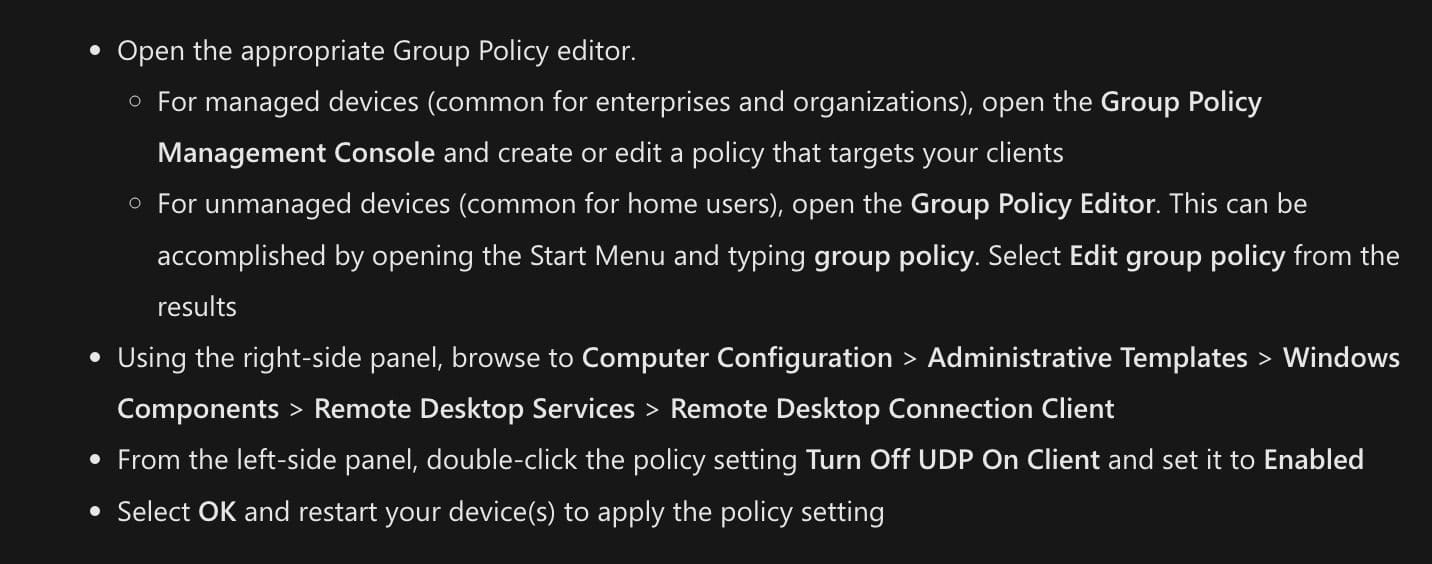
However, it is important to note that configuring the special Group Policy will disable UDP (User Datagram Protocol) for all Remote Desktop connections made from the device. You might also experience poor performance in Remote Desktop sessions after making changes in Group Policy.


Read our disclosure page to find out how can you help MSPoweruser sustain the editorial team Read more



Improve this guide




User forum
0 messages