
Microsoft makes it easier to set your default browser in Windows 11


 1 min. read
  Updated on
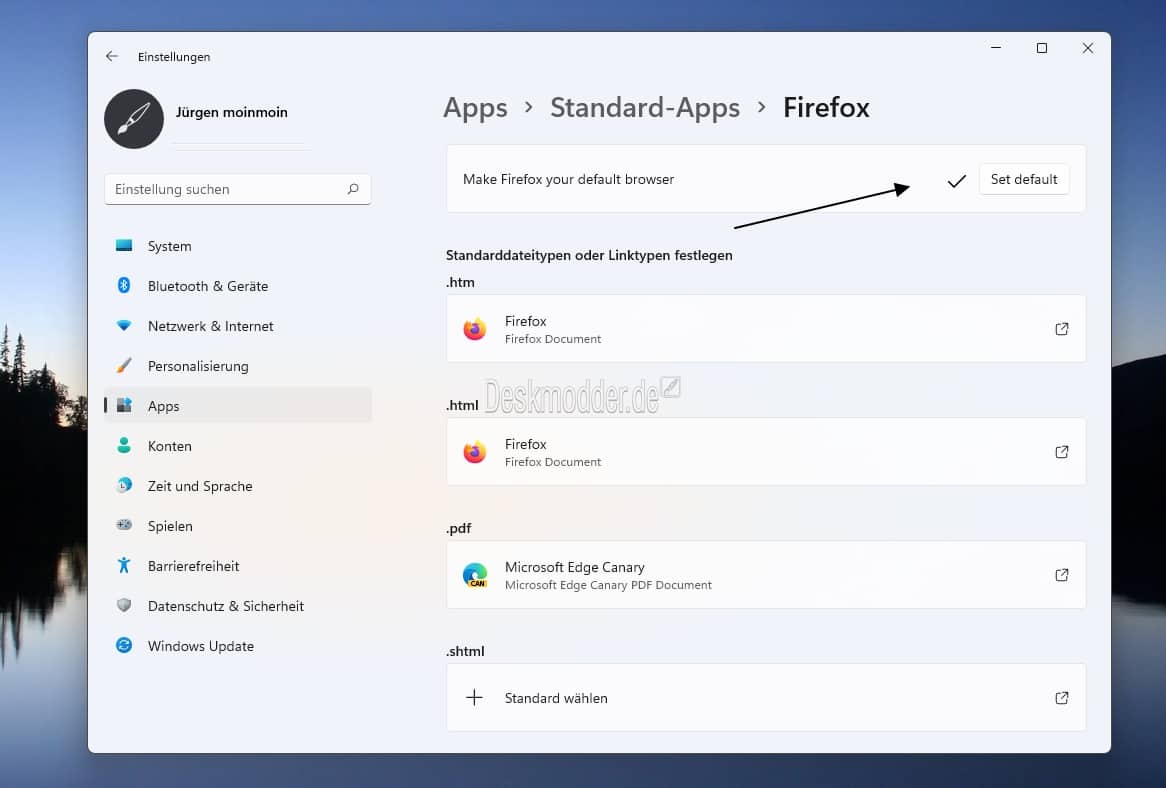
Microsoft has been courting much controversy in Windows 11 by making it difficult to set your default browser to anything but Edge.
After much outcry and a seeming change in strategy, Microsoft appears to have come round in the latest Windows 11 Insider Builds, and are now making it relatively easier to set the default browser to your own preference.
Deskmodder reports that Windows 11 Build 22509 now sports a new button in the Standard Apps section of settings which lets you easily set the default browser for your device.
This is of course not as convenient as having the browser do it itself, but it is better than setting each protocol individually to your preferred browser.
Unfortunately, the button only sets HTTP and HTTPS to your preferred browser, with Microsoft still for example defaulting PDFs to Edge. Slow progress, but still progress in any case.


Read our disclosure page to find out how can you help MSPoweruser sustain the editorial team Read more



Improve this guide




User forum
0 messages